Redirects vs rewrites
Both change what happens when someone visits a URL, but in different ways:
- A redirect tells the browser to go somewhere else. The address bar changes. Use a 301 (permanent) redirect when a page has moved for good, so search engines move your rankings to the new URL.
- A rewrite quietly serves a different URL behind the scenes. The address bar stays the same. Use it for things like pretty URLs that map onto an internal path.
Your options in Umbraco
Umbraco gives you several ways to manage URLs. Pick the simplest one that does the job:
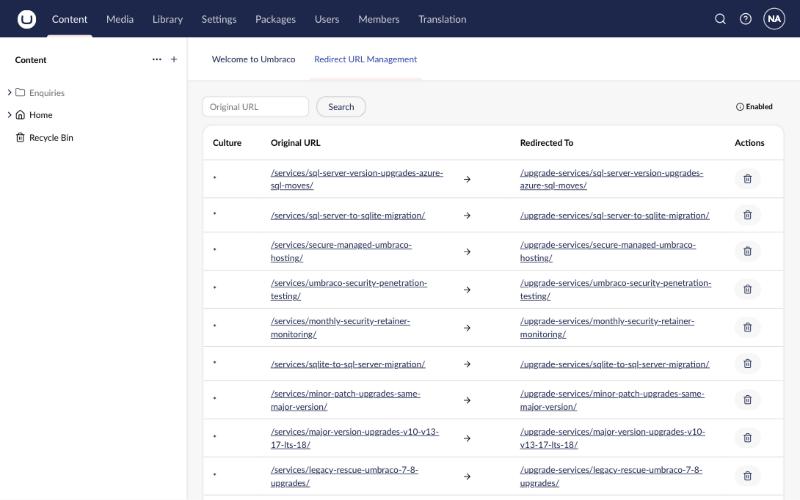
- Redirect URL Management (built in). When an editor renames or moves a published page, Umbraco automatically creates a 301 redirect from the old URL. Nothing to install.
- URL aliases (built in). Give a page extra URLs with the
umbracoUrlAliasproperty. See our tutorial on different URLs and domains for different pages. - Rewrite rules in your Umbraco site using ASP.NET Core's rewrite middleware. Rules live in your code, work on Windows and Linux, and cover site-wide patterns such as www, lowercase and trailing slashes. This is what the rest of this tutorial covers.
- Web server rules in IIS (
web.config) or nginx. Useful when you want redirects handled before requests reach Umbraco.
Step 1: Create a rules file
In the root of your Umbraco project, next to Program.cs, create a file called IISUrlRewrite.xml. It uses the same format as the IIS URL Rewrite module, but it runs inside your Umbraco site, so it also works on Linux.
Start with a single, simple rule:
<?xml version="1.0" encoding="utf-8"?>
<rewrite>
  <rules>
    <!-- /guides and /tutorial both go to /tutorials/ -->
    <rule name="Guides shortcut" stopProcessing="true">
      <match url="^(guides|tutorial)/?$" ignoreCase="true" />
      <action type="Redirect" url="/tutorials/" redirectType="Permanent" />
    </rule>
  </rules>
</rewrite>
match urlis a regular expression tested against the path, without the leading slash.stopProcessing="true"stops checking further rules once this one matches.redirectType="Permanent"sends a 301. UseFound(302) while you're testing.
Step 2: Register the rewriter in Program.cs
Open Program.cs and add the rewrite middleware after BootUmbracoAsync() and before UseUmbraco(). If it comes after Umbraco, Umbraco has already handled the request and your rules never run.
using Microsoft.AspNetCore.Rewrite;

WebApplicationBuilder builder = WebApplication.CreateBuilder(args);

builder.CreateUmbracoBuilder()
    .AddBackOffice()
    .AddWebsite()
    .AddComposers()
    .Build();

WebApplication app = builder.Build();

await app.BootUmbracoAsync();

app.UseHttpsRedirection();

// URL rewrites and redirects from IISUrlRewrite.xml. Must run before Umbraco handles the request.
app.UseRewriter(new RewriteOptions()
    .AddIISUrlRewrite(app.Environment.ContentRootFileProvider, "IISUrlRewrite.xml"));

app.UseUmbraco()
    .WithMiddleware(u =>
    {
        u.UseBackOffice();
        u.UseWebsite();
    })
    .WithEndpoints(u =>
    {
        u.UseBackOfficeEndpoints();
        u.UseWebsiteEndpoints();
    });

await app.RunAsync();
Step 3: Make sure the file is deployed
By default, .NET doesn't publish .xml files. Without this step everything works on your machine, then the site crashes on start-up in production because the file is missing. Add this to your .csproj:
<ItemGroup>
  <!-- URL rewrite rules read at startup by app.UseRewriter in Program.cs -->
  <Content Include="IISUrlRewrite.xml" CopyToPublishDirectory="PreserveNewest" />
</ItemGroup>
Step 4: Test it
Restart the site, then check the response headers. You should see a 301 and a Location header pointing at the new URL:
curl -I https://www.example.com/guides

# HTTP/1.1 301 Moved Permanently
# Location: /tutorials/Rules you can copy
These are the rules running on umbraco.ninja right now. Paste the ones you need inside <rules>, in this order.
Every broad rule below skips three things, so nothing important breaks:
- the backoffice (
/umbraco) and certificate checks (/.well-known) - files such as images, CSS and JavaScript (anything with an extension)
- anything that isn't a
GET, so form posts are never redirected
One domain: remove www
Search engines treat www.example.com and example.com as two different sites. Pick one and redirect the other:
<rule name="Remove www" stopProcessing="true">
  <match url="(.*)" />
  <conditions logicalGrouping="MatchAll">
    <add input="{HTTP_HOST}" pattern="^www\.(.+)$" />
  </conditions>
  <action type="Redirect" url="https://{C:1}/{R:1}" redirectType="Permanent" />
</rule>
{C:1} is the domain captured by the condition, and {R:1} is the path captured by match url. To do the opposite and add www, use the pattern ^(?!www\.)(.+)$ and the URL https://www.{C:1}/{R:1}.
Old Umbraco 7 and 8 URLs ending in .aspx
If you've upgraded from an old Umbraco site, links to /about-us.aspx may still be out there:
<rule name="Legacy .aspx URLs" stopProcessing="true">
  <match url="^(.+)\.aspx$" ignoreCase="true" />
  <action type="Redirect" url="/{ToLower:{R:1}}/" redirectType="Permanent" />
</rule>
Lowercase URLs
<rule name="Lowercase URLs" stopProcessing="true">
  <match url="^(.*[A-Z].*)$" ignoreCase="false" />
  <conditions logicalGrouping="MatchAll">
    <add input="{REQUEST_METHOD}" pattern="^GET$" />
    <add input="{REQUEST_URI}" pattern="^/(umbraco|\.well-known)(/|$|\?)" negate="true" />
    <add input="{REQUEST_URI}" pattern="\.[a-z0-9]{2,5}(\?.*)?$" negate="true" ignoreCase="true" />
  </conditions>
  <action type="Redirect" url="/{ToLower:{R:1}}" redirectType="Permanent" />
</rule>
Always add a trailing slash
Umbraco serves a page at both /about-us and /about-us/. Redirecting to one version stops search engines seeing duplicates:
<rule name="Add trailing slash" stopProcessing="true">
  <match url="^(.*[^/])$" />
  <conditions logicalGrouping="MatchAll">
    <add input="{REQUEST_METHOD}" pattern="^GET$" />
    <add input="{REQUEST_URI}" pattern="^/(umbraco|\.well-known)(/|$|\?)" negate="true" />
    <add input="{REQUEST_URI}" pattern="\.[a-z0-9]{2,5}(\?.*)?$" negate="true" ignoreCase="true" />
  </conditions>
  <action type="Redirect" url="/{R:1}/" redirectType="Permanent" />
</rule>
A whole section that moved
<rule name="Blog moved to news" stopProcessing="true">
  <match url="^blog/(.*)$" ignoreCase="true" />
  <action type="Redirect" url="/news/{R:1}" redirectType="Permanent" />
</rule>
A true rewrite (address bar doesn't change)
<rule name="Short offers URL" stopProcessing="true">
  <match url="^deals/?$" ignoreCase="true" />
  <action type="Rewrite" url="/special-offers/" />
</rule>
Prefer C#? Write rules in code
For a handful of simple redirects you can skip the XML file and chain them in Program.cs instead:
app.UseRewriter(new RewriteOptions()
    .AddRedirectToNonWwwPermanent()
    .AddRedirect("^old-page/?$", "new-page/", statusCode: 301)
    .AddRedirect("^blog/(.*)$", "news/$1", statusCode: 301));
Running on Linux with nginx
On Linux, nginx usually sits in front of your Umbraco site. You can keep your rules in IISUrlRewrite.xml (they still work), or handle host-level redirects in nginx before requests reach .NET:
# Redirect www and plain HTTP to https://example.com
server {
    listen 80;
    listen 443 ssl;
    server_name www.example.com;
    return 301 https://example.com$request_uri;
}

server {
    listen 443 ssl;
    server_name example.com;

    # One-off redirect handled by nginx
    location = /old-page { return 301 /new-page/; }

    location / {
        proxy_pass         http://127.0.0.1:5000;
        proxy_set_header   Host $host;
        proxy_set_header   X-Forwarded-For $proxy_add_x_forwarded_for;
        proxy_set_header   X-Forwarded-Proto $scheme;
    }
}
Windows: rules in IIS instead
If you host on IIS and have the URL Rewrite module installed, you can put the same rules in web.config so IIS handles them before .NET starts. Don't define the same rule in both places, or you'll get redirect loops.
<configuration>
  <system.webServer>
    <rewrite>
      <rules>
        <rule name="Remove www" stopProcessing="true">
          <match url="(.*)" />
          <conditions>
            <add input="{HTTP_HOST}" pattern="^www\.(.+)$" />
          </conditions>
          <action type="Redirect" url="https://{C:1}/{R:1}" redirectType="Permanent" />
        </rule>
      </rules>
    </rewrite>
  </system.webServer>
</configuration>
Troubleshooting
- "Too many redirects": two rules undo each other (for example, add and remove a trailing slash), or the same rule exists in IIS and in your site. Check with
curl -Iand follow eachLocation. - Backoffice won't load: a broad rule is catching
/umbraco. Add the exclusion condition shown above. - Forms stop working: a rule is redirecting POST requests. Add the
{REQUEST_METHOD}condition. - Site won't start after deploying:
IISUrlRewrite.xmlwasn't published. See step 3. - A rule seems ignored: rules run top to bottom, and
stopProcessingends the chain. Move specific rules above general ones.
Need a hand?
umbraco.ninja has more than 20 years of Umbraco experience. If you'd rather not do this yourself, we'll set it up, test it and hand it over.
Get a fixed-price quote